
Brand Kit TransferArc brand kit: logos, colours and guidelines.
The official TransferArc logos, icons, colours, typography and social media images, with the rules for using them. For customers, partners, media and designers — free to download, no sign-in.
Brand overview
- PreciseClear facts, real numbers, no hype.
- In motionForward-leaning shapes, lime accents on ink.
- DependableCalm layouts, high contrast, generous space.
TransferArc is transfer management software for passenger transport companies: airport transfer, chauffeur, taxi, shuttle, coach and tour operators. One platform runs bookings, pricing, dispatch, drivers, mobile apps, accounting and e-invoicing. It is a product of Innovate Solution.
The identity says the same thing: movement with control. The mark is three slanted bars that grow shorter and darker — a vehicle in motion, and the flow from booking to trip to books. The wordmark pairs a light "Transfer" with a bold, forward-leaning "Arc".
Write the name as one word with two capitals: TransferArc. Not "Transfer Arc", "Transferarc" or "TRANSFERARC" in running text.
Logos
Use the SVG wherever you can — it stays sharp at any size. PNG files have transparent backgrounds.
Primary logo (horizontal)

Vertical logo (stacked)
Stacked, on light
Square or tall spaces: posters, signage, title slides.

Monochrome / single colour

One colour, ink
Single-colour print, fax, engraving, light backgrounds.

One colour, white
Photos and coloured backgrounds where full colour fails.

Secondary: wordmark

Wordmark, ink
Only where the mark already appears nearby, or space is very wide and low.

Icon-only logo


App icon, ink tile
Square icon for profiles, app stores and directories.
App icon, lime tile
Alternative square icon where ink tiles are already used.
Logo usage
Clear space
Keep empty space around the logo equal to one bar of the mark (the bar height, 27% of the logo height) on every side. Nothing — text, edges, other logos — goes inside it.
Minimum size
- Horizontal logo
- 120 px wide on screen · 30 mm in print
- Stacked logo
- 64 px wide · 18 mm
- Wordmark
- 100 px wide · 25 mm
- Mark / icon
- 16 px · 6 mm
Approved use
- Use the supplied files, unchanged, at their original proportions.
- Full colour on ink or on white/paper; one colour (ink or white) everywhere else.
- Keep the clear space and the minimum size.
- Place the logo on calm areas of photos, with enough contrast (at least 3:1).
- Link the logo to www.transferarc.com when you use it online.
Prohibited use
Transfer Arc
Colour palette
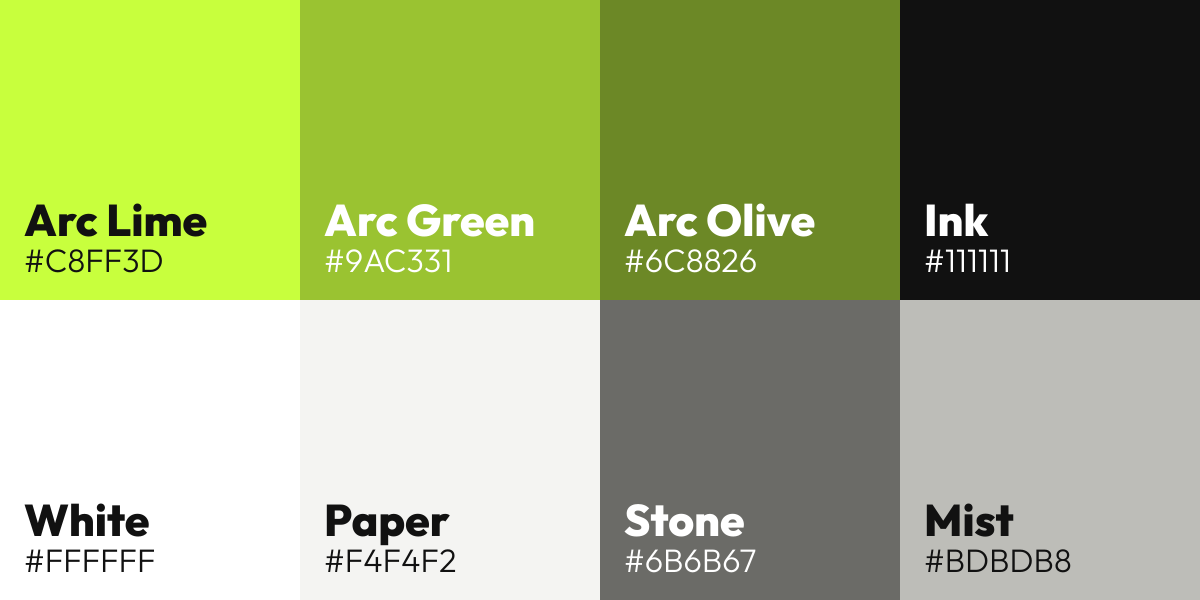
Lime on ink is the signature. Arc Green and Arc Olive exist only inside the mark — never use them for text or large areas. CMYK values are calculated starting points: ask your printer for a proof.
Arc Lime
Primary accent: buttons, highlights, first bar of the mark
- HEX
- #C8FF3D
- RGB
- 200, 255, 61
- CMYK
- 22, 0, 76, 0
Arc Green
Second bar of the mark only
- HEX
- #9AC331
- RGB
- 154, 195, 49
- CMYK
- 21, 0, 75, 24
Arc Olive
Third bar of the mark only
- HEX
- #6C8826
- RGB
- 108, 136, 38
- CMYK
- 21, 0, 72, 47
Ink
Primary dark: backgrounds, text on light
- HEX
- #111111
- RGB
- 17, 17, 17
- CMYK
- 0, 0, 0, 93
White
Text and logo on ink
- HEX
- #FFFFFF
- RGB
- 255, 255, 255
- CMYK
- 0, 0, 0, 0
Paper
Light page background
- HEX
- #F4F4F2
- RGB
- 244, 244, 242
- CMYK
- 0, 0, 1, 4
Stone
Secondary text on light backgrounds
- HEX
- #6B6B67
- RGB
- 107, 107, 103
- CMYK
- 0, 0, 4, 58
Mist
Secondary text on ink
- HEX
- #BDBDB8
- RGB
- 189, 189, 184
- CMYK
- 0, 0, 3, 26
Typography
The brand typeface is Outfit, an open-source geometric sans (SIL Open Font License, free for any use). The logo wordmark is drawn from Outfit and supplied as outlines — never retype it.
Aa Bb 123 — TransferArc
Outfit Light 300
Large headlines and the "Transfer" of the wordmark.
Aa Bb 123 — TransferArc
Outfit Regular 400 / Medium 500
Body text and interface.
Aa Bb 123 — TransferArc
Outfit SemiBold 600 / ExtraBold 800
Emphasis and buttons; ExtraBold slanted is reserved for "Arc".
Aa Bb 123 — TransferArc
IBM Plex Mono
Small labels, eyebrows, codes and numbers.
Other scripts on the website: IBM Plex Sans Arabic (Arabic), Noto Nastaliq Urdu (Urdu) and Noto Sans Bengali (Bangla). Fallback for documents: Arial or the system sans.
Iconography and visual elements

















The bar motif
The three slanted bars of the mark can be used large and ghosted (Ink on Ink, very low contrast) at the edge of covers and slides. Never as a pattern behind text.
The lime rule
A thin vertical lime stripe on the left edge of dark covers and share images.
Mono labels
Short uppercase labels in IBM Plex Mono with wide spacing, in lime on ink or stone on paper.
Shapes
Pill-shaped buttons, cards with 24 px corners, 1 px hairlines. Icons are simple line icons, 1.5–2 px stroke, round ends, one colour.
Backgrounds and contrast
Ratios follow WCAG 2.2: 4.5:1 for body text, 3:1 for large text, logos and icons.
| Foreground | Background | Ratio | Use |
|---|---|---|---|
| Aa White | Ink | 18.9:1 | All text |
| Aa Arc Lime | Ink | 16.0:1 | All text |
| Aa Ink | Arc Lime | 16.0:1 | All text |
| Aa Ink | Paper | 17.1:1 | All text |
| Aa Ink | White | 18.9:1 | All text |
| Aa Mist | Ink | 10.0:1 | All text |
| Aa Stone | Paper | 4.9:1 | All text |
| Aa Arc Lime | White | 1.2:1 | Do not use |
| Aa Arc Lime | Paper | 1.1:1 | Do not use |
Favicon and app icons
The website already uses these. The icon is the mark on an ink tile; tiny sizes use a larger mark so the three bars stay readable at 16 px.





| favicon.ico (multi-size) | 16 · 32 · 48 | favicon.ico | ICO2 KB |
| Scalable SVG favicon | SVG | favicon.svg | SVG1 KB |
| Favicon PNG | 16 × 16 | favicon-16x16.png | PNG1 KB |
| Favicon PNG | 32 × 32 | favicon-32x32.png | PNG1 KB |
| Favicon PNG (Google Search) | 48 × 48 | favicon-48x48.png | PNG1 KB |
| Favicon PNG | 96 × 96 | favicon-96x96.png | PNG1 KB |
| Favicon PNG | 192 × 192 | favicon-192x192.png | PNG3 KB |
| Apple touch icon (iOS home screen) | 180 × 180 | apple-touch-icon.png | PNG1 KB |
| Android / Chrome icon | 512 × 512 | android-chrome-512x512.png | PNG9 KB |
| Maskable PWA icon | 512 × 512 | maskable-icon-512x512.png | PNG3 KB |
| Safari pinned tab | SVG | safari-pinned-tab.svg | SVG1 KB |
| Web app manifest | JSON | site.webmanifest | JSON1 KB |
| iOS App Store icon (no transparency) | 1024 × 1024 | transferarc-ios-1024.png | PNG6 KB |
| Google Play store icon | 512 × 512 | transferarc-play-store-512.png | PNG2 KB |
| Android adaptive icon foreground | 432 × 432 | adaptive-foreground-432.png | PNG2 KB |


Downloads
Each package contains SVG and PNG files plus a short guideline sheet. The complete kit has everything on this page.
Complete brand kit
Every logo, icon, favicon, social image, colour file and font.
Download ZIP1.2 MB
Logos
All logo versions in SVG and PNG, from 160 px to 1920 px.
Download ZIP675 KB
Favicon & app icons
Favicons, web manifest, iOS, Google Play and Android adaptive icons.
Download ZIP50 KB
Social media package
Profile, cover, banner and share images for 10 platforms.
Download ZIP434 KB
Colour palette
ASE, GPL, CSS, SCSS, JSON and swatch sheet with HEX, RGB and CMYK.
Download ZIP59 KB
Typography
Outfit variable font with its SIL Open Font License.
Download ZIP58 KB
Using the TransferArc name and logo
You may use these files to refer to TransferArc — in articles, partner pages, integration lists, presentations and app directories. Do not use them in a way that suggests a partnership, endorsement or that you are TransferArc. TransferArc is a product of Innovate Solution Global Pte. Ltd. Questions or special requests: sales@transferarc.com.
This page is the single source of truth for TransferArc brand assets. Files linked from elsewhere may be out of date.
FAQ
Frequently asked questions.
Where can I download the TransferArc logo?
On the TransferArc Brand Kit page (/brand-kit). Every logo is available as SVG and transparent PNG, one by one or in a single ZIP file. The files are free to download and no sign-in is needed.
Which TransferArc logo file should I use?
Use the SVG of the horizontal logo whenever you can: the on-light version on white or light backgrounds, the on-dark version on dark ones. Use the one-colour (ink or white) version when full colour is not possible, the stacked logo for square or tall spaces, and the ink-tile icon for square avatars and app directories.
What are the TransferArc brand colours?
Arc Lime #C8FF3D and Ink #111111 are the main colours, with White #FFFFFF. Arc Green #9AC331 and Arc Olive #6C8826 are used only for the second and third bar of the mark. Light pages use Paper #F4F4F2. HEX, RGB and CMYK values and palette files are on the Brand Kit page.
What font does TransferArc use?
Outfit, an open-source sans-serif under the SIL Open Font License, with IBM Plex Mono for small labels. The logo wordmark is drawn from Outfit and supplied as outlines, so it should never be retyped.
Can I use the TransferArc logo on my website or in an article?
Yes, to refer to TransferArc — for example in an article, a partner or integration list, or a presentation — using the supplied files unchanged. Do not use it in a way that suggests a partnership or endorsement. For other uses, write to sales@transferarc.com.
Social media
Ready-to-upload images in each platform's recommended size. Profile images keep the mark inside a circle-safe area; covers keep the logo inside the area every device shows.